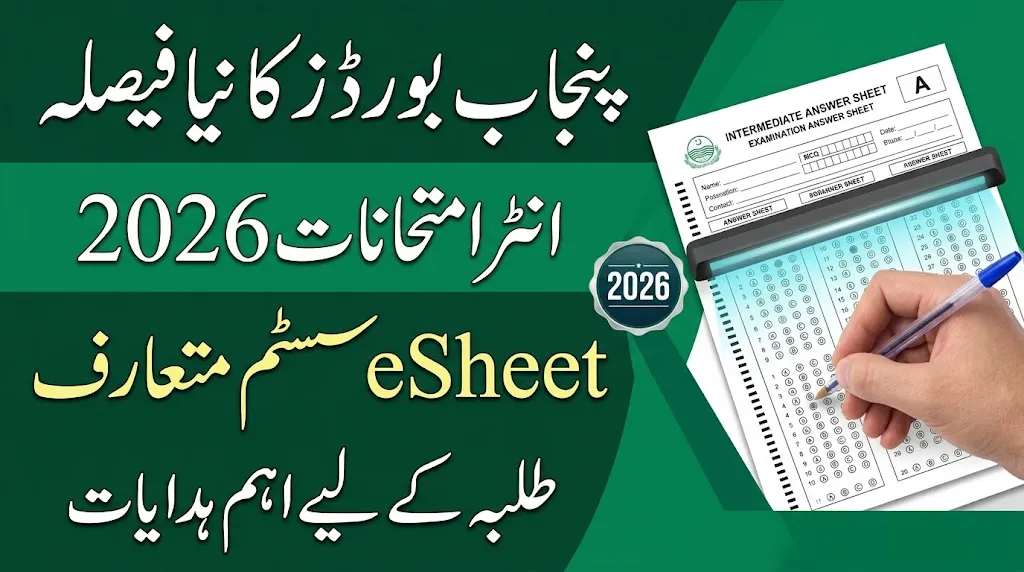
Punjab’s education boards have started introducing a new digital answer sheet marking system for selected Intermediate examination papers in 2026. Under this system, students will continue to write their answers on paper, but examiners will check scanned copies of answer sheets through a digital marking system.
Several boards, including BISE Lahore, Gujranwala, Multan, and Sargodha, have issued information and instructions regarding the eSheet system for the Intermediate Second Annual Examinations 2026.
The new system is aimed at improving the examination assessment process, making answer sheet checking more organized, and supporting the use of modern technology in education. However, students must follow the new answer sheet instructions carefully to avoid mistakes that could create problems during scanning and digital checking.
For students appearing in the upcoming Intermediate examinations, understanding the correct way to fill out an eSheet is important. Here is a complete guide explaining the instructions and important precautions candidates should follow.
Read Also : BSEK PM Chromebook Scheme Merit List Announced
پنجاب کے مختلف تعلیمی بورڈز نے انٹرمیڈیٹ سیکنڈ اینول امتحانات 2026 کے لیے منتخب پرچوں میں نیا eSheet سسٹم متعارف کروانا شروع کر دیا ہے۔ اس نظام کے تحت طلبہ پہلے کی طرح کاغذ پر اپنے جوابات تحریر کریں گے، تاہم امتحانات کے بعد جوابی کاپیوں کو اسکین کرکے ڈیجیٹل طریقے سے چیک کیا جائے گا۔ لاہور، گوجرانوالہ، ملتان اور سرگودھا سمیت مختلف بورڈز نے اس حوالے سے ہدایات جاری کی ہیں۔ طلبہ کو چاہیے کہ وہ رول نمبر، ایم سی کیوز کے بلبلز، ذاتی معلومات اور جوابات مقررہ جگہ پر احتیاط سے درج کریں۔ بارکوڈ، کیو آر کوڈ اور جوابی کاپی کے مخصوص حصوں پر غیر ضروری نشانات لگانے سے گریز کریں تاکہ اسکیننگ اور مارکنگ کے دوران کسی قسم کی پریشانی کا سامنا نہ کرنا پڑے۔
What Is the Punjab Board eSheet System?
The eSheet system is a digital answer sheet assessment method in which students write their examination answers on specially designed paper sheets. After the examination, the completed answer sheets are scanned and made available to examiners for digital evaluation.
This means students do not need to take their examinations on computers. They will still sit in examination halls and write their answers by hand.
The main difference is that examiners will assess scanned answer sheets instead of relying entirely on the traditional physical checking process.
The system also requires students to pay attention to roll number bubbles, MCQ responses, printed sections, barcodes, and designated writing spaces.
Read Also :Punjab Introduces New School Curriculum 2027: Textbooks to Become 25% Lighter
Punjab Boards Introducing the eSheet System
The following Punjab education boards have published information or instructions concerning the new digital marking system for selected Intermediate examination papers.
| Education Board | eSheet System Information |
|---|---|
| BISE Lahore | Information regarding the new marking system |
| BISE Gujranwala | Illustrated eSheet instructions |
| BISE Multan | Information regarding digital assessment |
| BISE Sargodha | Information regarding digital assessment |
Students should follow the latest instructions issued by their respective boards because answer sheet layouts and examination requirements may vary.
How to Fill Punjab Board eSheets Correctly
BISE Gujranwala has shared an illustrated guide explaining how students should complete the new eSheet format for Computer Science and Statistics examinations.
These instructions can also help students understand similar answer sheet formats used by other Punjab boards. However, candidates should always follow the printed instructions on their own examination answer sheets.
1. Use the Correct Pen
Students must use the writing instrument allowed by their examination board.
According to the BISE Gujranwala guide, candidates should use a blue ballpoint or fountain pen.
The guide does not allow gel pens, markers, or highlighters.
Students should arrange the permitted stationery before entering the examination hall. Using an unauthorized pen may create difficulties when answer sheets are scanned.
2. Write Your Roll Number Carefully
Entering the correct roll number is one of the most important steps when completing an eSheet.
Students must write their roll number in the designated boxes and fill the corresponding bubbles for each digit.
Candidates should carefully compare their roll number with the official examination roll number slip before filling in the bubbles.
An incorrect digit or improperly filled bubble may cause identification problems during answer sheet processing.
3. Complete All Required Personal Information
Students must fill in all required details in the appropriate sections of the answer sheet.
These details may include:
- Student’s name
- Father’s name
- Examination roll number
- Examination date
- Subject name
- Paper code
- Other required examination information
All information should be written clearly and accurately. Candidates should avoid leaving mandatory fields incomplete.
Read Also : CM Distributes 6,161 Laptops and Honhaar Scholarship Cheques Among Students in Punjab
4. Fill MCQ Bubbles Properly
Students must carefully mark their answers to multiple-choice questions.
The selected bubble should be completely darkened rather than marked with a tick, cross, or incomplete line.
Candidates should also make sure that the selected bubble matches the correct question number.
Important precautions include:
- Fill only the bubble corresponding to your selected answer.
- Do not leave partially filled bubbles.
- Avoid unnecessary marks around the options.
- Do not mark multiple bubbles unless instructed.
- Check the question number before selecting an answer.
Correctly filling MCQ bubbles is particularly important because these sections may be processed through digital scanning.
5. Write Short Answers in the Correct Sections
The new answer sheet format provides separate spaces for different examination questions.
Students must write each short answer in the section assigned to that particular question.
According to the BISE Gujranwala illustrated guide, short-question answers begin on page 5, with separate spaces provided for Questions 2, 3, and 4.
Candidates should carefully check the question numbers and avoid writing answers in unrelated sections.
The page arrangement may differ between subjects and education boards, so students must follow their actual answer sheet layout.
6. Complete Long Questions in the Allocated Spaces
Long questions must also be answered within their designated sections.
The BISE Gujranwala guide allocates separate answer spaces for Questions 5 to 9, beginning on page 19.
Students should carefully follow the printed question numbers and page arrangements.
They should avoid writing answers in the wrong sections or extending them into unrelated areas.
Managing the available space properly can help students complete their papers without creating confusion during digital assessment.
7. Do Not Write Over Barcodes or Margins
Barcodes, QR codes, and other printed identification marks are important parts of the eSheet system.
These printed elements help examination authorities identify and process scanned answer sheets.
Students must avoid:
- Writing over barcodes or QR codes.
- Damaging printed identification marks.
- Making unnecessary marks in the margins.
- Writing outside the designated answer areas.
- Drawing or making unrelated markings on the answer sheet.
Keeping these areas clear can help prevent scanning and identification problems.
Read Also : HEC Forms 22-Member Task Force to Introduce University Ranking System in Pakistan
8. Use the Designated Rough Work Page
Students should complete rough calculations and additional working in the space specifically provided for this purpose.
According to the BISE Gujranwala guide, page 34 is reserved for rough work.
The guide also states that additional answer sheets will not be provided.
Therefore, candidates should use the available space carefully and avoid wasting pages on unnecessary writing.
Students should also check the instructions printed on their own answer sheets before the examination.
9. Review Your Answer Sheet Before Submission
Before handing over the answer sheet, students should take a few moments to check all important details.
A final review should include:
- Correct roll number and corresponding bubbles.
- Complete personal and examination information.
- Properly filled MCQ bubbles.
- Answers written under the correct question numbers.
- No unnecessary markings on barcodes or margins.
- All required sections completed.
- Rough work written in the designated area.
This simple checking process can help students identify avoidable mistakes before submitting their papers.
Important eSheet Instructions at a Glance
The following table summarizes the main instructions students should remember during their Intermediate examinations.
| Requirement | Important Instruction |
|---|---|
| Pen | Use the permitted blue ballpoint or fountain pen according to the board guide |
| Roll Number | Write correctly and fill the matching bubbles |
| Personal Details | Complete all required information |
| MCQs | Completely darken the selected bubble |
| Short Questions | Write answers in their assigned sections |
| Long Questions | Follow the printed page allocation |
| Barcodes | Do not write over printed identification marks |
| Margins | Avoid unnecessary markings |
| Rough Work | Use the designated rough work page |
| Additional Sheets | Check the board’s instructions regarding extra sheets |
Will Students Take Exams on Computers Under the eSheet System?
No. Students will continue to take their Intermediate examinations using traditional pen-and-paper methods.
The digital system will be used during the assessment stage. After students complete their papers, examination authorities will scan the answer sheets and provide digital copies to examiners for marking.
Therefore, candidates do not need a computer, laptop, or internet connection to attempt their examinations.
Read Also : Sukkur IBA University Announces Graduate Admissions 2027 – Check Programs and Dates
What Should Students Do Before Intermediate Exams 2026?
Students appearing in the Intermediate Second Annual Examinations 2026 should become familiar with the new answer sheet format before their papers.
They should carefully read the instructions issued by their respective education boards and understand how to fill roll number bubbles, complete MCQs, and write answers in the allocated spaces.
Candidates should also avoid relying only on instructions issued by another board because the layout and page numbers may vary.
Following the official guidelines can help students complete their answer sheets correctly and reduce avoidable mistakes during the scanning and assessment process.
Final Words
The introduction of the eSheet system by Punjab education boards is an important development in the modernization of the Intermediate examination process. Although students will continue writing their answers on paper, digital scanning and on-screen marking will change how selected examination papers are assessed.
Students should pay special attention to roll number bubbles, MCQ responses, answer sections, barcodes, and rough work instructions. Understanding these requirements before entering the examination hall can help candidates avoid common mistakes.
Candidates are advised to follow the latest instructions issued by their respective education boards and carefully read the guidelines printed on their examination answer sheets.